.AU
🇦🇺 TLD characteristics
Back to top
👥 Contact requirements
Back to top
🛠️ Create
- 1
-
Create a contact with the registrant’s contact data. For a detailed description on creating a contact, See the ➤ Create a new contact KB-article.
ℹ️ If you already have an existing registrant contact that you want to use, you can skip this step and continue with step 2.
- 2
-
Add the required .AU contact properties to the registrant contact. For a detailed description on adding contact properties, See the ➤ Contact properties KB-article.
ℹ️ If the contact properties are already added, you can skip this step and continue with step 3.
- 3
-
Request the create through our portal. For a detailed description on requesting a create, See the ➤ Create domain(s) KB-article.
- 4
-
Once requested, the create will be completed real-time.
⏱️ Creates remain suspended if additional documents/actions are required, our support staff will contact you through email if this is the case.
Back to top
🔁 Transfer in
- 1
-
Create a contact with the registrant’s contact data. For a detailed description on creating a contact, See the ➤ Create a new contact KB-article.
ℹ️ If you already have an existing registrant contact that you want to use, you can skip this step and continue with step 2.
- 2
-
Add the required .AU contact properties to the registrant contact. For a detailed description on adding contact properties, See the ➤ Contact properties KB-article.
ℹ️ If the contact properties are already present, you can skip this step and continue with step 3.
- 3
-
Request the transfer through our portal. For a detailed description on requesting a transfer, See the ➤ Transfer domain(s) KB-article.
- 4
-
Once requested, the transfer will be completed real-time.
⏱️ Transfers remain suspended if additional documents/actions are required, our support staff will contact you through email if this is the case.
Back to top
♻️ Renew
- 1
-
To request a renewal, follow the instructions in the ➤ Renew domains KB-article.
Back to top
🕒 Restore
- 1
-
To request a restore, follow the instructions in the ➤ Restore domain KB-article.
Back to top
🧾 Registrant change
- 1
-
Create a contact with the new registrant’s contact data. For a detailed description on creating a contact, See the ➤ Create a new contact KB-article.
- 2
-
Add the required .AU contact properties to the new registrant contact. For a detailed description on adding contact properties, See the ➤ Contact properties KB-article.
- 3
-
Request the registrant change through our portal. For a detailed description on updating the registrant contact, See the ➤ Update domain(s) KB-article.
- 4
-
Once requested, the registrant change will be completed real-time.
⏱️ Registrant changes remain suspended if additional documents/actions are required, our support staff will contact you through email if this is the case.
Back to top
🚮 Delete
- 1
-
To request a delete, follow the instructions in the ➤ Delete domain KB-article.
Back to top
📤 Transfer out
- 1
- Make sure no server or client transfer prohibited status is active for the domain to be transferred.
- 2
- To start the outgoing transfer, contact the gaining registrar for information on their incoming transfer procedure.
Back to top
⚙️ Contact properties
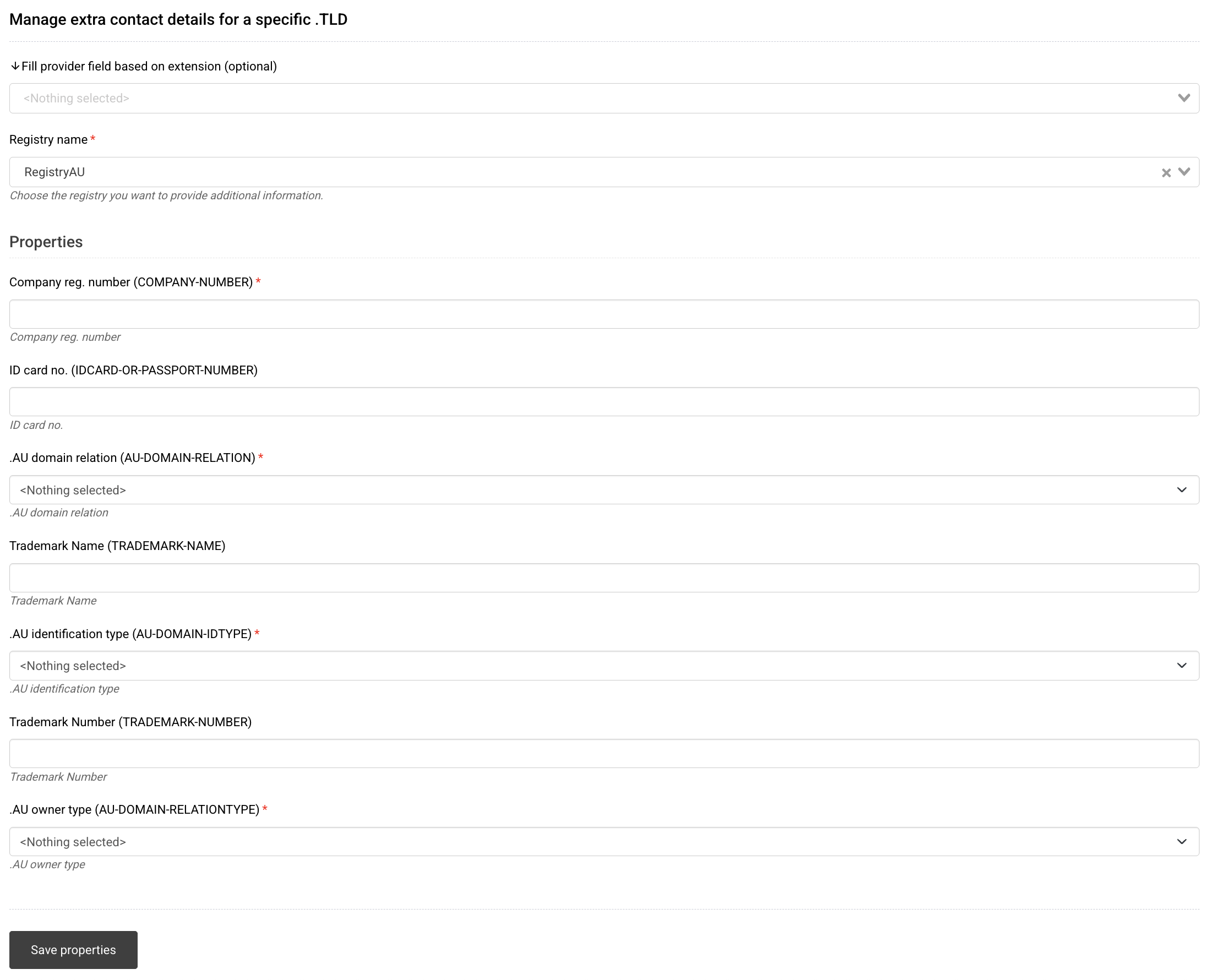
To add contact properties for .AU (RegistryAU) to a contact, follow the instructions in the ➤ Contact properties KB-article up until step #2. Once you select the .AU (RegistryAU) contact properties option, the fields shown below appear.
- 1
-
Company reg. number (COMPANY-NUMBER): Company registration number of the registrant organisation.
- Use the official registration number issued by the relevant corporate or business registry.
- Applies to companies and other registered organisations.
⚠️
Ensure the company registration number corresponds to the legal entity. Incorrect data may affect eligibility.
- 2
-
ID card no. (IDCARD-OR-PASSPORT-NUMBER): Identification number for the registrant (individuals).
- Provide the number from a valid ID document (passport or national ID).
- Used when the registrant is an individual.
⚠️
Use only valid identification details belonging to the registrant.
- 3
-
.AU domain relation (AU-DOMAIN-RELATION): Describes how the domain name relates to the registrant.
- 1 – Exact match / acronym / abbreviation of name or trademark
- 2 – Closely and substantially connected
- 3 – Otherwise authorised to use the name
⚠️
The registry may request supporting documentation.
- 4
-
.AU policy reason (AU-POLICY-REASON): Optional field used to describe the justification for allocation.
- Provide only when additional clarification is required.
⚠️
Incorrect information may impact eligibility validation.
- 5
-
.AU registrant type (AU-DOMAIN-REGTYPE): Category that defines the registrant’s legal type.
- Must match the registrant’s eligibility category.
⚠️
Mismatches may result in registry suspension.
- 6
-
.AU Australian presence (AU-DOMAIN-AUSPRESENCE): Basis of Australian presence.
- Must be consistent with provided identifiers.
⚠️
Inconsistent data may invalidate the registration.
- 7
-
.AU owner type (AU-DOMAIN-RELATIONTYPE): Legal or organisational type of the registrant.
- Charity
- Citizen / Resident
- Company
- Registered Business
- Trademark Owner
- Trust
⚠️
Select the option that accurately reflects the registrant’s legal status.
- 8
-
Click Save properties to confirm adding the properties to the contact.
📘 Contact properties metadata description
Back to top
✅ Eligibility & Allocation requirements
⚠️ Important: Please note that if registrant data does not meet the eligibility & allocation requirements, domains will be suspended and ultimately deleted by the registry.
.AU
| Item |
Rule |
Clause |
| Eligibility |
Applicant must be Person/Entity with Australian Presence, which includes:
- Individuals
- Australian citizens
- Australian permanent residents
- Organisations
- Companies registered in Australia
- Registrable Bodies with an ARBN
- Incorporated Associations
- ABN holders
- Indigenous Corporations
- Registered Organisations
- Cooperatives
- Registered Charities
- Registered Political Parties
- Partnerships with eligible Australian partners
- Unincorporated Associations with an Australian management committee
- Trusts with an Australian trustee
- Educational Institutions regulated in Australia
- Government
- Government bodies
- Statutory agencies
- Commonwealth entities
- Trade Mark Owners
- Exact-match Australian Trade Mark owners or applicants
|
2.4.2(1) + definition in 1.4 (“Australian Presence”) |
| Allocation |
- Match of legal/business/personal name
- Acronym
- Match of an Australian Trade Mark
- Match/acronym of related body corporate name
- Match/acronym of partnership/trust name
- Match/synonym of services, goods, events, activities or premises
|
2.4.2(2)(a–f) |
.COM.AU
| Item |
Rule |
Clause |
| Eligibility |
Applicant must be a Commercial Entity and have Australian Presence.
Commercial Entities include:
- Companies & corporate bodies
- Companies under the Corporations Act
- Commonwealth entities
- Registrable Bodies (ARBN)
- Incorporated Associations
- Incorporated limited partnerships
- Trading cooperatives
- ABN-based entities & trusts
- ABN-holding entities or individuals
- Non-charitable trusts with an ABN
- Statutory bodies & government
- Statutory bodies engaging in trade or commerce
- Government bodies
- Foreign trade mark holders
- Foreign entities with an exact-match Australian Trade Mark
|
2.4.4(1) + definition of “Commercial Entity” in 1.4 |
| Allocation |
- Match of legal/business/personal name
- Acronym
- Match of an Australian Trade Mark
- Match/acronym of related body corporate name
- Match/acronym of partnership/trust name
- Match/synonym of services, goods, events, activities or premises
|
2.4.4(2)(a–f) + 2.4.5 (Exact Match for Trade Mark–based presence) |
.NET.AU
| Item |
Rule |
Clause |
| Eligibility |
Applicant must be a Commercial Entity and have Australian Presence.
Eligible registrants include:
- Australian companies / ARBN entities
- Statutory bodies engaging in trade or commerce
- Government bodies
- Incorporated Associations / limited partnerships / cooperatives
- ABN-based entities and non-charitable trusts
- Foreign exact-match Australian Trade Mark holders
|
2.4.4(1) + definition of “Commercial Entity” in 1.4 |
| Allocation |
Same as .COM.AU. |
2.4.4(2)(a–f) + 2.4.5 |
.ORG.AU
| Item |
Rule |
Clause |
| Eligibility |
Applicant must be a Not for Profit Entity and have Australian Presence.
Not for Profit Entities include:
- Incorporated bodies & registries
- Incorporated Associations
- Indigenous Corporations
- Cooperatives not trading
- Registered charities & trusts
- Registered Charities
- Charitable trusts (DGR)
- Associations & unions
- Registered Organisations (unions/employer associations)
- Charitable & ancillary funds
- Charitable trusts (DGR)
- Public/Private Ancillary Funds
- Entities on ACNC register
- Political & public bodies
- Registered Political Parties
- Government / statutory agencies
- Foreign embassies/consulates accredited in Australia
|
2.4.6(1) + definition of “Not for Profit Entity” in 1.4 |
| Allocation |
- Match or synonym of services/programs/events/activities/premises
- Match of legal/business/statutory name
- Acronym of that name
- Match of an Australian Trade Mark
- Match of trust name (if applicant is trustee)
|
2.4.6(2)(a–e) |
.ASN.AU
| Item |
Rule |
Clause |
| Eligibility |
Applicant must be a Not for Profit Entity or an Unincorporated Association, and have Australian Presence.
Eligible registrants include:
- All Not for Profit Entity types listed under .ORG.AU
- Unincorporated Associations
- Formed in an Australian State/Territory
- With an Australian citizen/permanent resident management committee
|
2.4.7(1) + definitions in 1.4 |
| Allocation |
- Match or synonym of services/programs/events/activities/premises
- Match of legal/business/statutory or association name
- Acronym
- Match of an Australian Trade Mark
|
2.4.7(2)(a–d) |
.ID.AU
| Item |
Rule |
Clause |
| Eligibility |
Applicant must be a natural Person and have Australian Presence.
Eligible registrants include:
- Individuals 18 years or older
- With Australian Presence (citizen or permanent resident)
|
2.4.8(1) + definition of “Person” and “Australian Presence” in 1.4 |
| Allocation |
- Match of legal name (first or family)
- Acronym/abbreviation of legal name
- Nickname
|
2.4.8(2)(a–c) |
.EDU.AU
| Item |
Rule |
Clause |
| Eligibility |
Applicant must meet the eligibility criteria of Schedule A – edu.au Child Zones.
Eligible registrants include:
- Education providers regulated under Australian law
Refer to Schedule A for full list. |
2.4.11 + Schedule A |
| Allocation |
Domain name must comply with the allocation rules in Schedule A. |
Schedule A |
.GOV.AU
| Item |
Rule |
Clause |
| Eligibility |
Applicant must be an Australian Government Body, as .gov.au is a closed namespace.
Eligible registrants include:
- Commonwealth, State & Territory government departments
- Local government bodies
- Statutory agencies and authorised bodies
|
2.1.3 (closed namespaces) + gov.au policy |
| Allocation |
Domain name must follow the official gov.au naming policy. |
gov.au policy |
Back to top
📄 Document requirements
‼️Please note that supporting documents only have to be provided on request of the registry. When a domain create/transfer/registrant change is requested and the registry asks for documents, you'll receive an email from our support staff requesting the documents.‼️
| Entity Type |
Acceptable Documents |
| 👤 Australian citizens |
- Australian Passport
- Australian Citizenship Certificate
- Australian Birth Certificate
- Australian Driver Licence
|
| 🛂 Australian permanent residents |
- Foreign Passport + Visa Grant Notice
- VEVO check result
- Permanent residency label (legacy)
|
| 🏢 Companies (ACN) |
- ASIC Company Extract
- Certificate of Registration
|
| 🏛️ Registrable Bodies (ARBN) |
- ASIC ARBN Registration Extract
- Certificate of Registration as a Foreign Company
|
| 📜 Incorporated Associations |
- Certificate of Incorporation
- State/Territory Association Registry Extract
|
| 🔢 ABN holders |
- ABN registration summary (ABR)
- ATO ABN confirmation
|
| 🤝 Partnerships |
- ABN showing partnership structure
- Partnership agreement
- ID of at least one AU-resident partner
|
| 📁 Trusts |
- Trust Deed
- ABN showing trustee relationship
- ASIC extract (if corporate trustee)
|
| ❤️ Registered Charities |
- ACNC Register extract
- Charity registration certificate
|
| 🏛️⚖️ Political Parties |
- AEC registration certificate
- AEC party extract
|
| 📘 Unincorporated Associations |
- Constitution / governing rules
- List of AU-resident management committee members
- Operational evidence (e.g. utility bill, lease agreement)
|
| 🎓 Educational Institutions |
- ASQA or TEQSA registration extract
- State/Territory school registration
- CRICOS listing
|
| 🏛️ Government Bodies |
- Letter on government letterhead
- Legislative establishment document / Gazette notice
- Listing in official Government register
|
| ™️ Trade Mark Owners |
- TM application or registration certificate (IP Australia)
- TM Headstart extract
- TM number + extract
|
Back to top

