
Customize the whois data accuracy reminder (WDRP) email
Login to the portal and go to Account > Branding
ℹ️ Note
The Whois data accuracy reminder (WDRP) email is sent yearly to registrants of domains to verify that the domain registration details are still correct.
The Whois data accuracy reminder (WDRP) email is sent yearly to registrants of domains to verify that the domain registration details are still correct.
To customize the Whois data accuracy reminder (WDRP) email through the portal, follow the steps below.
⚠️ Important
When the domain’s expiry date and anniversary date align, the WDRP email is combined with 30-day expiration (ERRP) email template. When combined, this email template is not used at all to reduce the amount of emails sent to registrants.
Advice on email content
It is recommended to leave the default content of this template unchanged and add explanatory text to the system default. Additionally, not all text in this email can be customised. Registry policies require registrants to receive specific information in the WDRP email, which must remain unchanged.
When the domain’s expiry date and anniversary date align, the WDRP email is combined with 30-day expiration (ERRP) email template. When combined, this email template is not used at all to reduce the amount of emails sent to registrants.
Advice on email content
It is recommended to leave the default content of this template unchanged and add explanatory text to the system default. Additionally, not all text in this email can be customised. Registry policies require registrants to receive specific information in the WDRP email, which must remain unchanged.
- 1
- Select the brand you want to update and open the Whois data accuracy reminder (WDRP) email template by clicking the edit button.
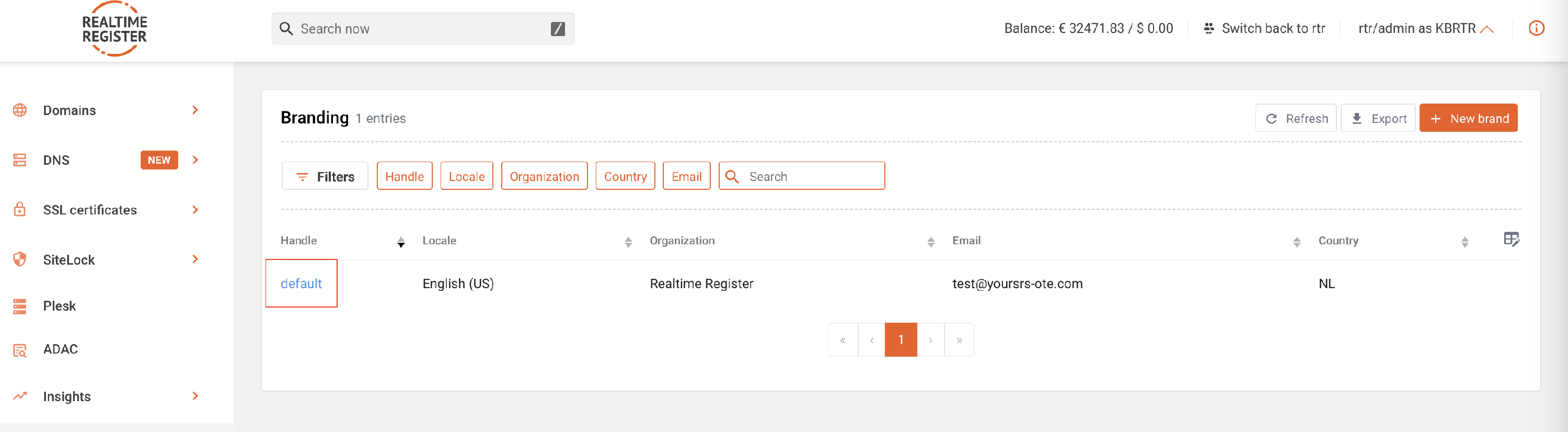

- 2
- On the Whois data accuracy reminder (WDRP) email template detail page, you can apply the required customizations.
⚠️ Important
The emails are available as both text-only and HTML email. If you want your registrants to receive text-only email, keep the HTML version empty. If you want to communicate using HTML email, fill in both the text version and the HTML version.
The emails are available as both text-only and HTML email. If you want your registrants to receive text-only email, keep the HTML version empty. If you want to communicate using HTML email, fill in both the text version and the HTML version.

- 3
- By default, the minimum text and required variables for this email template are already entered. Add explanatory text describing why the Whois data accuracy reminder email is sent to the registrant.

- 4
- The update preview button allows you to preview the submitted changes to the Whois data accuracy reminder (WDRP) email template on the right side of the screen.
⚠️ Important
This email template contains multiple previews. A base template preview exists for general WDRP requirements, while additional previews exist for .NU and .SE domains with specific registry requirements. When custom text or HTML is added, the changes will be applied to all preview versions of the template.
This email template contains multiple previews. A base template preview exists for general WDRP requirements, while additional previews exist for .NU and .SE domains with specific registry requirements. When custom text or HTML is added, the changes will be applied to all preview versions of the template.


- 5
- To add an image to the Whois data accuracy reminder (WDRP) email, see the ➤ Add images to email templates KB-article.
- 6
- Once you have made all required changes, click update template to save the Whois data accuracy reminder (WDRP) email template. A confirmation message will be displayed when the update has completed.


- 7
- You have now successfully customized the Whois data accuracy reminder (WDRP) email.